


A proxy server acts as an intermediary between a user’s device and services on the internet. Proxies can help manage network access, enforce security policies, cache content and obscure IP addresses in certain circumstances. However, not every proxy provides the same degree of anonymity or protection, making it important to understand the different types before choosing one.
This guide compares four proxy categories based on the identity information they pass along, explains forward and reverse proxies, and discusses how they work and when organizations might use them.
What is a Proxy Server?
Proxy server A proxy is a server or software that receives requests from clients and then forwards them to their destination or retrieves the response from a cache. When you open a web page through a proxy, the destination server may see the connection as originating from the proxy, not directly from the user’s device. The identity details that remain visible depend on the proxy type, its header configuration, and its protocol.
Imagine an office that requires all computers to pass through a single network gateway. This gateway can determine which sites are allowed to access, log certain activities, save bandwidth through caching, or inspect requests before forwarding. That gateway is a simple analogy of a proxy. In other architectures, proxies are placed in front of website servers to help manage visitor traffic.
It’s important to remember that a proxy is not synonymous with encryption, VPN, antivirus, or firewall. A proxy can be part of a protection system, but security is ultimately determined by network design, authentication, configuration, and the HTTPS connection used.
How Does a Proxy Server Work?
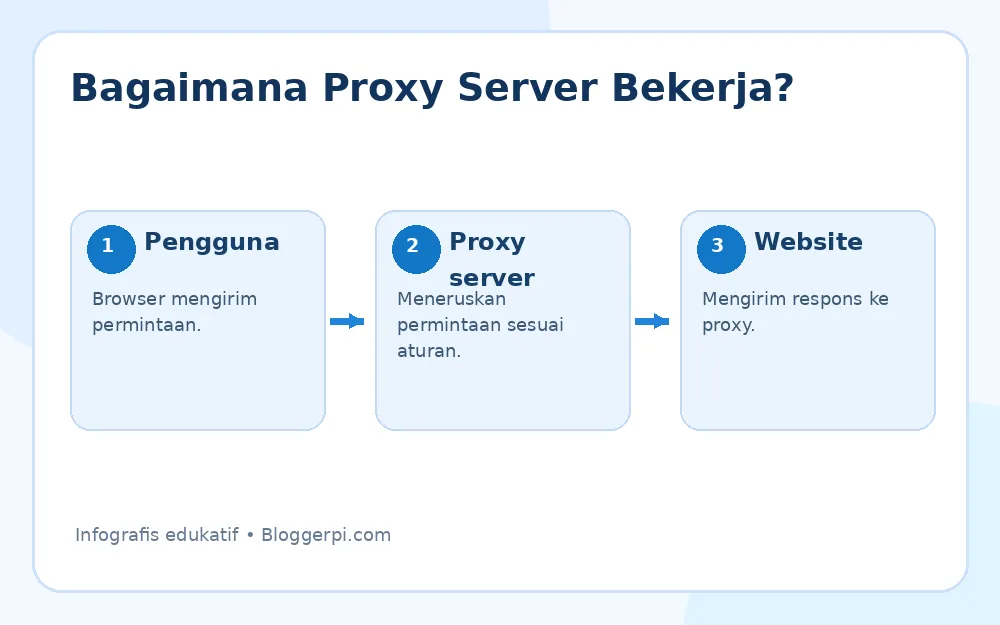
The basic flow is that the user sends a request, the proxy processes it according to the defined policy, and then a response is sent back to the user. The process can be described in the following steps.
1. User Sends Request
When a browser requests a website, the traffic will be routed to a proxy if the device, application, or network settings require it. The request may contain the hostname, HTTP method, and other information needed to establish a connection.
2. Proxy Processes and Forwards Requests
A proxy server can check access rules, add or remove headers, forward requests to the destination server, or send cached responses. Some proxies enforce user authentication before allowing a connection.
3. Destination Server Sends Response
The destination website responds to the request. The proxy can then forward the results, optimize specific content, or temporarily cache it according to its caching policy. Further technical discussion is available in the guide. how proxy servers work on the internet.
Types of Proxy Servers Based on Identity Level
The following traditional classification distinguishes proxies by how much of the client’s identity or the proxy’s presence is revealed to the destination server. This term is generally used for HTTP proxies; its implementation is not always uniform across service providers.
1. Transparent Proxy
Transparent proxy Typically, they are in the path of network traffic without the user having to manually configure the proxy address. Proxies can cache, monitor usage, or enforce policies on school, office, and public networks. In some configurations, user origin information can still be transmitted, making this type of proxy unsuitable for anonymity.
Example: Office networks restrict access to specific website categories across all computers. Network administrators can enforce these policies without configuring individual employee browsers. The advantage is centralized management, but the drawbacks include limited privacy and the potential for disruption if configuration is incorrect.
2. Anonymous Proxy
Anonymous proxy This method attempts to hide the client’s original IP address from the destination and replaces it with the proxy’s IP address. However, the destination can still determine whether the request passes through the proxy service through its headers or connection characteristics. The actual level of privacy also depends on browser settings, cookies, account logins, DNS, and the capabilities of the proxy operator.
This method can be useful for testing how a site appears from different networks or for reducing IP exposure in certain contexts. Don’t assume it provides perfect anonymity, especially when logging into personal accounts or providing identifying information directly.
3. High-Anonymity or Elite Proxy
The type that is often called elite proxy attempts to avoid transmitting the user’s true IP address or easily identifiable proxy indicators in HTTP headers. However, sites can detect proxy use through IP reputation, connection patterns, or other anti-fraud mechanisms. The marketing term ‘high anonymity’ does not guarantee that user activity cannot be identified.
If considering this type of web testing, check the provider’s reputation, logging policies, and compliance with the destination’s terms of service. For activities requiring high anonymity, consider a comprehensive security approach, not just the choice of service labels.
4. Distorting Proxy
Distorting proxy is a term often used for a proxy that modifies IP address information in certain headers, so that the client’s identity presented to a website does not match its actual address. Its implementation and definition vary between services; therefore, this term should be understood as a behavioral pattern, not a single technical standard.
Before using it, learn which headers are modified and whether the service affects analytics tracking, site localization, or access to applications that enforce IP address restrictions.

Types of Proxies Based on Their Position in the Network
Forward Proxy
Forward proxies work on behalf of a user or group of clients. Their uses include controlling outbound access from the internal network, enforcing internet usage policies, caching, and separating the user’s device connection from the destination server. They can be explicit, defined in the browser, or transparent, defined in the network infrastructure.
Reverse Proxy
A reverse proxy sits in front of one or more application servers. Visitors access the reverse proxy first, and then the traffic is distributed to the origin server. An example is load balancing, TLS termination, static asset caching, incoming request management, and origin server protection from certain traffic.
For website owners, reverse proxies are often more relevant than anonymity proxies. When discussing origin addresses and CDNs, you can also read the guide IP address of the website behind Cloudflare DNS to better understand the network layers involved.
Functions and Benefits of Proxy Server
Controlling Internet Access and Usage
Companies can implement rules based on users, devices, domains, or content types. This approach helps administrators maintain consistent access policies. Clear communication of these rules is essential to prevent network monitoring from creating internal privacy issues.
Bandwidth Efficiency with Caching
Certain proxies can cache secure responses so that subsequent requests don’t always have to retrieve data from the origin server. The benefit depends on the nature of the content, cache headers, and traffic patterns. Private or dynamic content requires more careful policies.
Protection Layers for Web Applications
Reverse proxies can combine request rate limiting, authentication, routing, and application security policies. However, not all proxies have these features. To understand the context of network addresses, see the article what is an IP address.
Supporting Testing and Diagnostics
QA teams can use proxies to examine the behavior of HTTP requests and responses, run tests from different networks, or diagnose caching and routing issues. Testing should be performed on systems that are authorized for access.
Risks and Limitations of Using Proxies
Free proxies operated by unknown operators can carry risks of activity logging, ad insertion, unstable connections, and data misuse. Furthermore, proxies that do not encrypt the relevant channels do not automatically protect the contents of communications from those who can observe the traffic.
The destination website may still recognize users from login accounts, cookies, browser fingerprints, or the data they send. Proxies can also increase latency and become a single point of failure if there is no redundancy. Therefore, do not use proxies as your sole information protection strategy.
Tips for Choosing the Right Proxy Server
1. Determine the Purpose of Use
For office access control, prioritize authentication, access policies, and auditability. To manage website traffic, consider a reverse proxy with caching and load balancing. For diagnostics, check logging capabilities and header settings.
2. Security and Privacy Evaluation
Check who the operator is, how data is stored, their logging policies, HTTPS support, authentication mechanisms, and security update procedures. Never send sensitive credentials through an untrusted proxy.
3. Check Performance and Reliability
Measure latency, bandwidth, availability, server location, and recovery capability in the event of a node failure. The needs of a high-traffic site differ from those of a single user.
4. Pay attention to the Terms of Use
Ensure that your proxy usage complies with applicable laws, your organization’s policies, and the terms of the service you access. Using a proxy does not relieve you of your responsibility to use internet services lawfully.
For additional considerations, please also read benefits of using a proxy server which discusses the context of its use further.

Frequently Asked Questions
Are proxy servers and VPNs the same?
No. Proxies typically act as intermediaries for specific applications or protocols, while VPNs typically create network tunnels for configured traffic to pass through. Encryption capabilities, logging, and protection coverage are determined by each implementation.
Does using a proxy make users untraceable?
There is no such guarantee. Sites can still identify accounts, cookies, and device characteristics. Proxy operators may also have connection logs.
Do all proxies speed up website access?
No. Caching can speed up the response under certain conditions, but longer routes or overloaded proxy servers can actually slow it down.
Conclusion
Four popular terms—transparent, anonymous, high-anonymity, and distorting proxy—discuss how identity information is handled. Meanwhile, forward and reverse proxies describe the technology’s position and role within the network architecture. The best choice isn’t the most “anonymous” proxy advertised, but rather a configuration that’s fit for purpose, secure, reliable, and auditable.
