


When someone enters your website’s address in a browser, a system must store its files, run any required applications and deliver its pages. This depends on a web hosting service. Understanding hosting helps business owners, bloggers and online store operators choose infrastructure that suits their needs—not just the cheapest plan.
This guide explains how hosting works, how it differs from a domain name, the available service types and the essential checks to make before subscribing. That way, you can select a hosting service based on your website’s actual requirements.
What is Hosting?
Hosting is a service that provides server resources to store and serve websites or applications so they can be accessed via the internet. These resources can include storage space, CPU, memory, network, server software, and database access. The technical management of each component can be handled by the provider, the site owner, or shared depending on the chosen service model.
Hosting is often compared to the land on which a house is built, while the domain is the address. This analogy is helpful for beginners, but in practice, hosting services are much more complex because the server must continuously receive requests, maintain performance, manage security, and store application data that can change every second.
A simple website might suffice with a resource-sharing service. Conversely, applications with many transactions and visitors require greater capacity, management, and redundancy. Therefore, hosting packages should be tailored to the website’s workload, not just the number of pages it has.
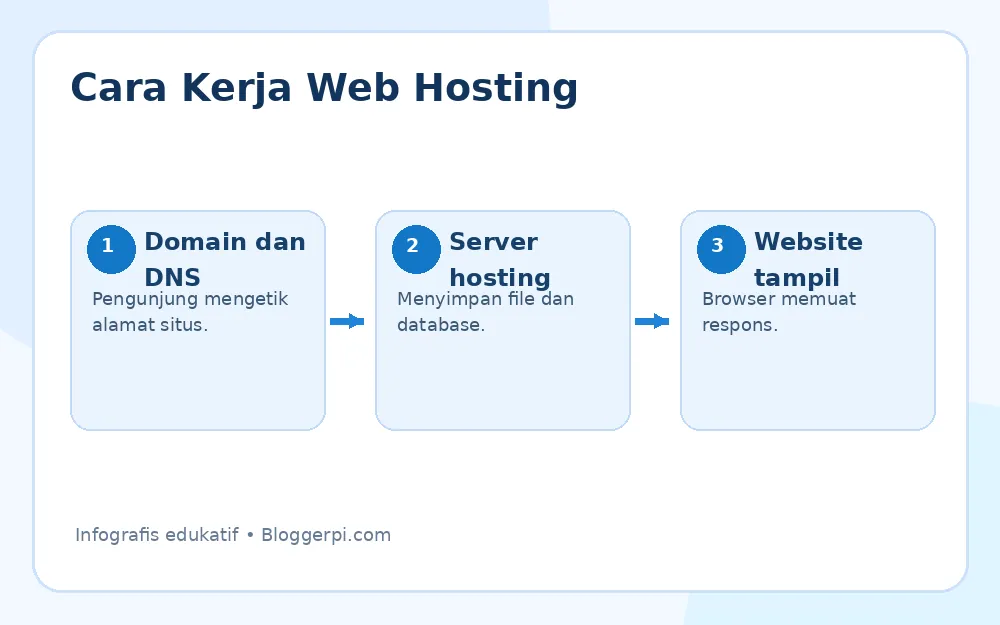
How Does Web Hosting Work?
1. Files and Databases are Stored on the Server
After you create a website, the theme files, images, documents, application code, and database are placed on a hosting environment. For WordPress, for example, the server needs to run PHP and a supported database system to generate dynamic pages.
2. Domain Directed via DNS
When a visitor types a domain name, the DNS resolution process helps the browser locate the address of the server or intermediary service that handles the site. The connection is then routed according to the configuration, including the use of a CDN, reverse proxy, or load balancer if available.
3. Server Sends Response to Browser
The server receives the HTTP/HTTPS request, executes the necessary processing, and then delivers the HTML and supporting assets such as CSS, JavaScript, and images. The browser then assembles everything into a usable website.
Differences between Hosting, Domains, and Websites
These three terms are related, but have different roles. Domain is the name of the address such as example.com. Hosting is a computing environment that serves website requests. Meanwhile, website A website is a collection of pages, functions, and content created using HTML, a Content Management System (CMS), or other applications.
You can have a domain without active hosting, or run an application on an IP address without a dedicated domain. However, combining a memorable domain with reliable hosting usually provides a better user experience.
If you’re just starting out with a website, this guide How to install WordPress for beginners can help understand the steps after hosting is set up.
Commonly Used Types of Hosting
1. Shared Hosting
With shared hosting, multiple websites share the resources of a single server environment. The provider manages most of the basic configuration, allowing users to simply upload files or install a CMS through the control panel. These plans are typically affordable and suitable for personal blogs, portfolios, or small business websites with low traffic.
The downside is that resources are shared with other customers, and configuration freedom is limited by the provider’s policies. If a site is particularly demanding, the provider may impose CPU, memory, or process limits to prevent disruption to other customers. Before purchasing, check the applicable resource limits, not just the advertised storage capacity.
2. VPS Hosting
Virtual Private Server A VPS (Vehicle-to-Server Server) is a virtual server that provides a more isolated environment, usually with a specific CPU and RAM allocation. Customers gain greater control over installing software, managing services, and optimizing configurations as needed.
A VPS is suitable for growing websites, custom applications, or teams requiring more flexibility. However, an unmanaged VPS requires system administration, security updates, monitoring, and backup capabilities. For an overview of its implementation, read the tutorial. create a VPS web server with Webuzo and LAMP As a conceptual reference, ensure the operating system and its packages are updated to current vendor support.
3. Cloud Hosting
Cloud hosting utilizes computing resources from a cloud infrastructure that can encompass multiple physical and virtual servers. Its main advantages are flexibility in scale and a customizable management model. In some architectures, redundancy also helps mitigate the impact of a single component failure.
However, “cloud” doesn’t automatically mean a website never experiences downtime. Reliability still depends on application design, data replication, availability zones, and the configuration used. Costs also need to be monitored, as some services calculate computing, storage, and traffic usage separately.
4. Dedicated Server
A dedicated server provides a single physical machine for a specific customer’s needs. This model is suitable for workloads that require extensive control, custom configurations, or specific compliance requirements. Physical isolation is an advantage, but customers still need to design their own security, backup, monitoring, and recovery strategies.
Dedicated servers tend to be more expensive than shared hosting plans. Don’t assume a dedicated server is always faster; actual performance is still influenced by machine specifications, applications, and network configuration.
5. Managed WordPress Hosting
Managed WordPress hosting is a service that prioritizes WordPress needs, such as managing updates, caching, staging, backups, and dedicated technical support. This service can be run on various types of infrastructure, including shared, VPS, or cloud. Therefore, ‘WordPress hosting’ is not a hardware category that is directly equivalent to a dedicated server.
If your website is based on this CMS, also learn why WordPress is widely chosen for blogs and websites, while considering its feature and maintenance needs.

Functions and Uses of Hosting for Websites and Businesses
Publishing Website Pages
The most basic function of hosting is to make content accessible over the internet. Without an active server environment, website files stored on a local computer cannot be accessed by the public in the usual way.
Running CMS and Applications
Hosting provides the runtime, database, storage, and connectivity to run WordPress, an online store, a membership portal, or a custom application. Each application’s requirements are different, so compatibility specifications should be checked before migration or installation.
Storing Data and Handling Transactions
E-commerce applications require databases to store products, order status, and user activity. Here, hosting quality significantly impacts application responsiveness. Protecting payment data also requires application security design and using an appropriate payment provider, not just choosing a specific hosting plan.
Support Email with Own Domain
Some hosting plans offer business email, but this service isn’t always included. You can also use a separate email provider through DNS configuration. Compare sending reputation, capacity, account security, and authentication mechanisms like SPF, DKIM, and DMARC if email is a critical business channel.
Helping Website Security and Availability
Hosting can provide TLS certificate support, backup systems, firewalls, account isolation, monitoring, and network protection. However, not all features are automatically enabled. Security still requires updated applications and plugins, strong passwords, access control, and tested recovery. The context of server maintenance is discussed further in what is server maintenance.
Tips for Choosing the Right Hosting
1. Map Website Traffic and Characteristics
Note the type of CMS, number of visitors, storage requirements, frequency of content changes, and the highest processing load. A company profile website, for example, is different from an online store that processes many orders simultaneously.
2. Check CPU, RAM, Storage, and Bandwidth Limits
Don’t just look at the ‘unlimited’ storage number. Look for information about inode limits, processes, CPU usage, memory, databases, and fair usage policies. A capacity that’s suitable for today’s conditions should still have room for growth.
3. Select the appropriate server and network location.
Data center location can affect latency, although CDN usage and good routing also play a role. Test access from the locations where most users are located, rather than relying solely on server region claims on the sales page.
4. Uptime Evaluation and Technical Support
Check the terms and conditions service-level agreement, outage history, support hours, and how to submit an emergency ticket. The promised uptime percentage should be read in conjunction with the compensation terms; an SLA promise is not a guarantee that outages will not occur.
5. Make Sure There is a Backup and Recovery Path
Ask how often backups are performed, how long they are retained, whether copies are available in separate locations, and whether the restore process can be tested. If backups are critical, also provide independent backups outside the same hosting provider.
6. Calculate the Total Cost, Not the Promotional Price
Compare prices for renewals, domains, email, certificates, migration costs, backup capacity, and additional security features. The first-year purchase price can be significantly different from the long-term operating costs.
7. Migration Ease Test and Management Panel
Ensure you have access to files, databases, DNS, error logs, and data export and migration procedures. If you need to migrate WordPress, the guide How to move WordPress hosting without changing the domain can be a reference for preparation.

Common Mistakes When Choosing Hosting
Just Compare Initial Package Prices
A low price doesn’t necessarily mean savings if the service isn’t capable of handling your site’s needs. Expenses due to downtime, data recovery, or sudden migrations can outweigh the difference in package price.
Assuming SSL and Backup are Already Included
Many providers offer TLS certificates and backups, but their scope, timelines, and recovery processes vary. Please confirm this in writing in the package description.
Not Taking Ease of Upgrade into Account
Choose a service that makes it easy to add resources or migrate when traffic increases. Planning ahead will reduce the risk of sudden technical work during peak business hours.
Frequently Asked Questions
Is hosting necessary to create a website?
Public websites require infrastructure to serve user requests. This infrastructure can take the form of a traditional hosting package, a managed website platform, or a cloud deployment service. Therefore, you’ll always need a place to run and serve your website, even if the payment model differs.
Does buying a domain mean you already get hosting?
Not necessarily. Domain registration and web hosting are two different services, although they are often sold as one package.
Is shared hosting enough for a business website?
Yes, especially for small websites with light traffic and simple needs. Monitor performance and resource limits; upgrade if application needs begin to exceed the package’s capacity.
Which hosting is best for WordPress?
There’s no one-size-fits-all answer. Choose based on site complexity, team capabilities, security needs, budget, and available technical support.
Conclusion
Hosting is the technical foundation that makes a website available online. Shared hosting offers convenience and a low initial cost; VPS provides more control; cloud hosting offers flexibility; dedicated servers provide dedicated physical resources; and managed WordPress hosting simplifies CMS operation. Consider application requirements, performance, security, backups, support, and total cost before deciding.
Reference
- Google Cloud — What Is Web Hosting? (updated October 15, 2026).
- Google Cloud — What Is Cloud Hosting?.
- Cloudflare Docs — Domains.
