


Forgot your home Wi-Fi password, or need internet access while traveling? There are legitimate ways to view the credentials for a network already saved on your own device, share access with a QR code, or ask the operator of a public hotspot for authorization. None of these methods requires guessing someone else’s password or exploiting a router without permission.
This guide covers legal, device-supported methods for Windows, iPhone, Android and your own router, plus safer ways to use public Wi-Fi in airports, hotels and cafés. An earlier version included examples involving router bypasses and WPS apps; those instructions have been replaced with security-focused approaches while preserving the old screenshots and an archived community map for context.
Ways to view Wi-Fi passwords with permission
| Situation | Recommended method | Requirement |
|---|---|---|
| Windows 11 has saved the network | Show the password through Settings or Known networks | Your own or properly managed computer |
| iPhone has saved the network | Settings → Wi-Fi → Password, or the Passwords app | Face ID, Touch ID, or device passcode |
| Android has saved the network | Share the network through its QR code where supported | Owner access and device authentication |
| Your home Wi-Fi | Check the label or authorized router settings | Network administrator’s permission |
| Airport, café, or hotel hotspot | Ask staff or use the venue’s official instructions | The network is provided for guests |
1. View a saved Wi-Fi password in Windows 11
Using the Settings menu
On supported Windows 11 versions, open Settings → Network & internet, select the currently connected Wi-Fi network’s properties and look for the option to Show its saved password. You may also find previously saved networks through Manage known networks. Exact menu wording can vary by Windows version and organizational policy.
This is not a way to gain access to a stranger’s network: Windows is revealing a credential that the authorized computer already has. An IP address is also different from a Wi-Fi password; finding a network’s address does not reveal its security key.
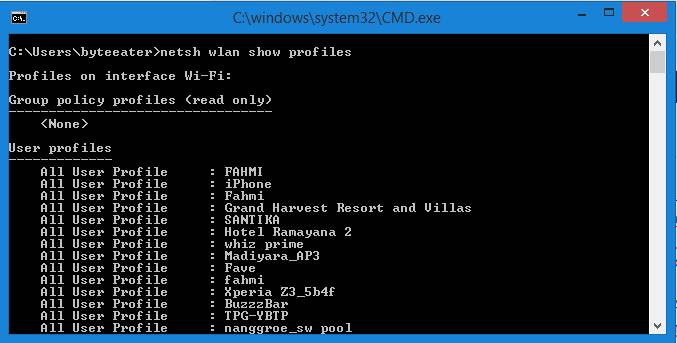
Historical screenshots of older Windows interfaces
The following screenshots came from an earlier version of this article. They show interfaces from older software versions; menus have changed, and old procedures should not be used on devices you are not authorized to manage.


2. Find a saved Wi-Fi password on an iPhone
Apple explains that on iOS 16 or later, you can open Settings → Wi-Fi, tap the information icon next to a network, then select Password and authenticate using Face ID, Touch ID or your device passcode. On iOS 18 and later, saved Wi-Fi details can also be accessed in the Passwords app.
When sharing your connection with a family member or friend using Apple devices, the built-in password-sharing feature may be safer than photographing credentials and sending them to a public group. Network bandwidth influences browsing quality, but it does not provide a shortcut to discovering another person’s password.
3. Share saved Wi-Fi access on Android
Many current Android phones let an authorized user open Settings → Network & internet or Connections → Wi-Fi, select a known network, then choose Share or display a QR code. Most devices ask for a PIN, pattern or biometric verification before revealing shareable connection details.
These options differ between manufacturers and Android versions. Consult the device maker’s instructions when a menu is missing. Avoid apps claiming to crack Wi-Fi passwords: they may demand unrelated access, show deceptive ads or create security risks without providing legitimate connectivity.
4. Check the password of your own router
If you own or administer the router, inspect the original device label, your internet provider’s documentation, or the router’s official administration interface. When the Wi-Fi password has changed, another authorized device that remains connected may be able to share its saved settings.
Do not try default administrator credentials on equipment that is not yours. You must have explicit authority to manage the network.
Replace default passwords and insecure settings
Network administrators should change default Wi-Fi and administrator passwords, install appropriate router firmware updates, use WPA2-AES or WPA3 where supported, and disable WPS when it is unnecessary. Do not give router administrator access to strangers. Proxy servers and network gateways perform different functions from Wi-Fi authentication and should not be confused with it.
5. Get legitimate public Wi-Fi access in cafés, hotels and airports
Check the official SSID on a posted sign or ask a staff member which network guests should use. Some venues provide a login portal, receipt code or other permitted method. Verify the network name carefully to avoid malicious hotspots impersonating a legitimate venue.
Prefer secure HTTPS connections and avoid sensitive transactions when you cannot trust the network. If the login page’s URL looks suspicious, ask staff for the correct address rather than entering your primary account password.
Archived airport Wi-Fi map from the original article
The community map below is preserved as a historical reference. Its hotspot locations, passwords and access permissions have not been verified for 2026. Follow each airport operator’s current rules rather than assuming an old community listing is permission to connect.
6. Security tips for public Wi-Fi
- Verify the hotspot SSID and whether the venue requires official authentication.
- Use HTTPS, keep your operating system updated and enable multifactor authentication on important accounts.
- Turn off automatic joining of untrusted networks and remove suspicious saved connections.
- Do not enter an important password into a login page on an unfamiliar domain.
- Never share your Wi-Fi password or access-card photos publicly.
If your business offers guest internet, create a separate guest network, apply reasonable bandwidth limits and provide access instructions that collect no unnecessary personal data. A local connectivity problem is not the same as a DDoS incident or a web server’s HTTP 502 error, so diagnose them separately.
7. Why is Wi-Fi connected but websites will not open?
A device connecting to a router does not mean the internet connection is working. Possible causes include an ISP outage, captive portal, DNS issue, incorrect device time or a website-specific service failure. Compare the result on a different device or network before concluding that the Wi-Fi password is the problem.
For website owners, a crawler’s inability to load a page can also be caused by server settings, DNS, security rules or application errors. Technical SEO and uptime checks are separate from troubleshooting the local wireless connection.
More archived screenshots
The following two screenshots come from earlier Windows and Android demonstrations. Their interface details or methods may no longer reflect current security practices.

Frequently asked questions about Wi-Fi passwords
1. Can I discover a Wi-Fi password without permission?
This guide addresses only networks you own, manage or have permission to access.
2. How do I see a saved password in Windows 11?
Open Settings → Network & internet and inspect the connected network or Manage known networks for the Show option.
3. Where are saved passwords on an iPhone?
iOS 16 and later can show them in Wi-Fi settings after authentication. iOS 18 and later also offers the Passwords app.
4. Can Android share Wi-Fi with a QR code?
Many modern Android devices support this after owner authentication.
5. Is a Wi-Fi password the same as a router administrator password?
Not necessarily. One connects devices to the network; the other controls router settings.
6. Should WPS be enabled?
Administrators can disable it if unnecessary and choose stronger authentication.
7. What if I forget my own router password?
Consult the official vendor or ISP recovery instructions and follow authorized reset procedures.
8. Is an airport Wi-Fi map always accurate?
No. Community information may be outdated and does not establish permission.
9. Is free Wi-Fi always safe?
No. Confirm the SSID, use HTTPS, enable MFA and avoid impersonated hotspots.
10. Why does Wi-Fi connect without internet access?
It could be an ISP, DNS, captive portal or server issue. Test another network and device.
11. Are “Wi-Fi hacker” apps trustworthy?
They are not recommended, especially when requesting excessive permissions or unauthorized access.
12. How do I share access with guests?
Use your device’s official QR sharing option or set up a dedicated guest network.
Official references
- Microsoft Support — Connect to Wi-Fi and view saved passwords
- Apple Support — Find saved Wi-Fi passwords on iPhone
- Android Help — Connect to and share Wi-Fi
