

What does the ChatGPT Business Hub dashboard actually look like after a business claim is approved? This review documents the interface using three authentic screenshots from Kelanakids, an Indonesian business that completed the initial claim process. Instead of implying that every feature is live immediately, we examine what the dashboard genuinely shows: confirmed website access, blank brand insights, a pending identity-verification prompt, and links to additional business tools.
The distinction matters because claim approval, domain verification, and Persona identity verification are not the same milestone. In the Kelanakids account, Website access is labeled Access confirmed. Nevertheless, the business overview still asks its administrator to verify their identity with a government-issued ID before making changes to business information or publishing an agent. The metrics for mentions, profile views and website clicks show dashes rather than figures.
Last reviewed: November 16, 2026. OpenAI introduced Businesses in ChatGPT in beta on November 10, 2026. Availability, menu labels, reporting thresholds, identity checks and Business Agent eligibility can change. This guide differentiates what is visible in the screenshots from what OpenAI states in its public documentation.
What Is ChatGPT Business Hub?
Business Hub is the business-management area associated with Businesses in ChatGPT. Authorized representatives can claim a business listing, demonstrate their connection to the organization, review its information, and—after completing applicable verification—submit updates and use available insights. For eligible commerce businesses, OpenAI also describes product-feed connectivity and a separate Business Agent experience.
Think of the product as three related but distinct layers. A listing is the business profile that ChatGPT may show to a customer. A claim establishes administrative access after the required proof of ownership or authority. Persona verification is an additional identity-and-authority check required before certain management and reporting capabilities are unlocked. An agent is not a prerequisite for appearing as a business in ChatGPT.
For digital marketers, this is a new source of aggregated AI-discovery signals, not a replacement for ChatGPT Search SEO strategy, trust and E-E-A-T practices, or reliable website analytics. OpenAI can use other sources in its answers and independently decide how to compare businesses. Owning a profile does not guarantee recommendation placement, visibility, or sales.
How to Access Business Hub After Claiming Your Business
If you have not claimed your listing yet, start with our illustrated companion guide on how to claim your business on ChatGPT. It covers matching the correct business, selecting a verification method, adding a DNS TXT record, waiting for review, and confirming approval. The steps below begin after that initial claim has been accepted.
- Sign in to ChatGPT using the account authorized to manage the business claim.
- Open Business Hub in the ChatGPT web sidebar, or follow the official Businesses in ChatGPT entry point.
- Select the claimed business and open its overview page.
- Check the website-access status, any alerts, and the Insights area.
- If the overview requests identity verification, use the official Verify flow and complete the Persona review.
- After approval, explore whichever profile-editing, product-feed, and agent features your business is eligible to use.
The following screenshots appear in the exact order supplied with this review: Admin Dashboard Overview (1), (2), then (3). They illustrate different dashboard sections and should not be mistaken for a mandatory click sequence. We explain each image separately, preserving what it actually shows and flagging what cannot be inferred from it.
ChatGPT Business Hub Dashboard Overview: Three Real Screenshots
Screenshot 1: Website Access Confirmed and Top Five Discovery Topics
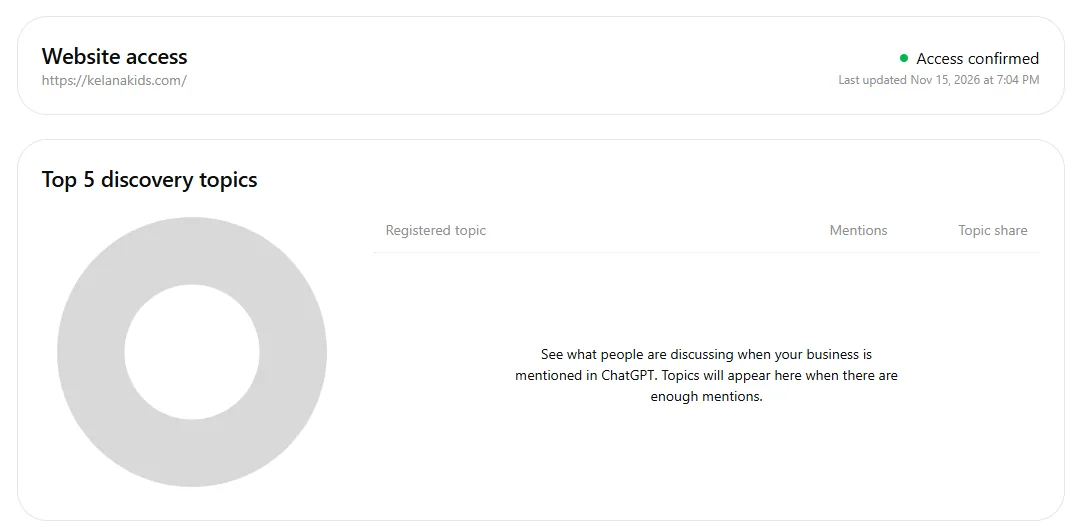
The upper panel is labeled Website access and names https://kelanakids.com/. A green status marker accompanies Access confirmed, with a timestamp reading Last updated Nov 15, 2026 at 7:04 PM. This supports a specific conclusion: the account had confirmed website access at that timestamp. It does not, by itself, establish that the business owner completed identity verification with Persona.
The larger panel underneath is titled Top 5 discovery topics. It includes a grey donut visualization and the column labels Registered topic, Mentions, and Topic share. No actual topics appear. Instead, the interface says that discovery topics will be shown when the business has enough mentions in ChatGPT.
OpenAI describes discovery topics as broad conversation themes from answers in which a business was referenced or cited. They may later help an owner understand which subject areas are associated with the brand, but they are not users’ private prompts, search-engine keyword exports, or direct evidence of purchase intent. Marketing teams can treat them as one qualitative input alongside independent search-demand research and customer feedback.
Screenshot 2: Brand Insights, Reporting Windows and Empty Metrics
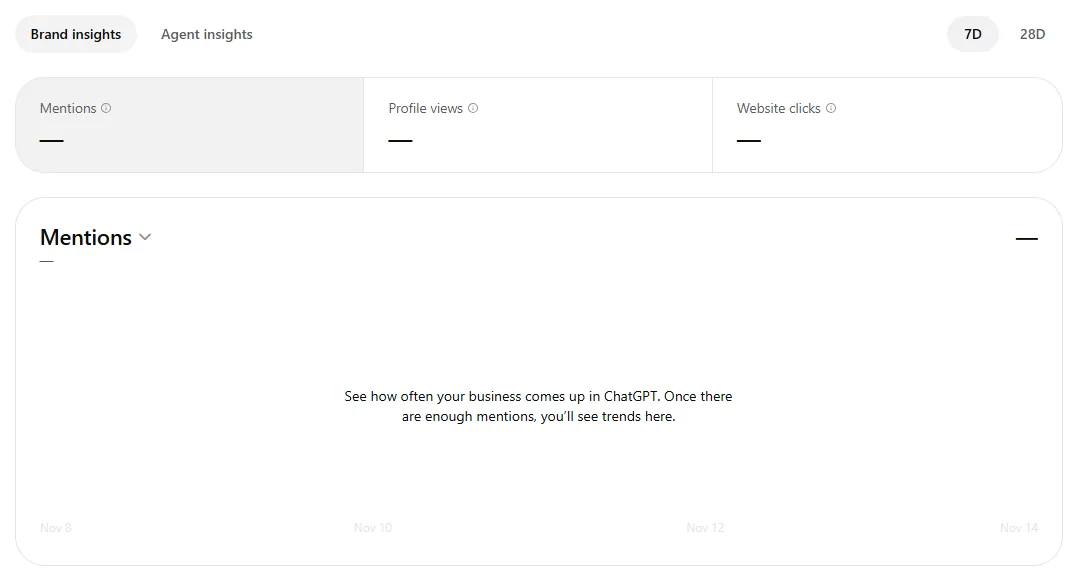
The second image introduces Brand insights and Agent insights tabs. Two visible time-window controls—7D and 28D—offer ways to inspect activity over different periods when reporting is available. A row of summary cards lists Mentions, Profile views, and Website clicks, each with a dash rather than a numeric value.
The Mentions panel below is also empty. A help message explains that the chart will show trends once there are enough mentions. This is an important limitation: a dash is not proof of zero brand appearances or zero traffic. OpenAI notes that values may remain blank when activity does not meet reporting thresholds, data is still being collected, or reporting is unavailable for that business.
According to OpenAI, an online-business mention is counted when ChatGPT references the business website, not merely when it utters the brand name. A local-business mention can be counted when a result for the location is displayed, even without a profile open or website visit. Website clicks reflect click-through activity to the business site as reported by the platform. The screenshot shows Profile views as a metric label, but it does not disclose the underlying counting method; it would be misleading to equate the value to Google Analytics users or sessions.
These measures can be useful in context, but they are aggregate platform indicators, not a replacement for analytics, conversion tracking, or an advertising attribution model. Compare them with on-site engagement, pages people visit after a click, and form submissions rather than relying on a single dashboard number. Our SEO tools overview explains other tools that serve complementary purposes.
Screenshot 3: Kelanakids Overview, Identity Verification and Get Started
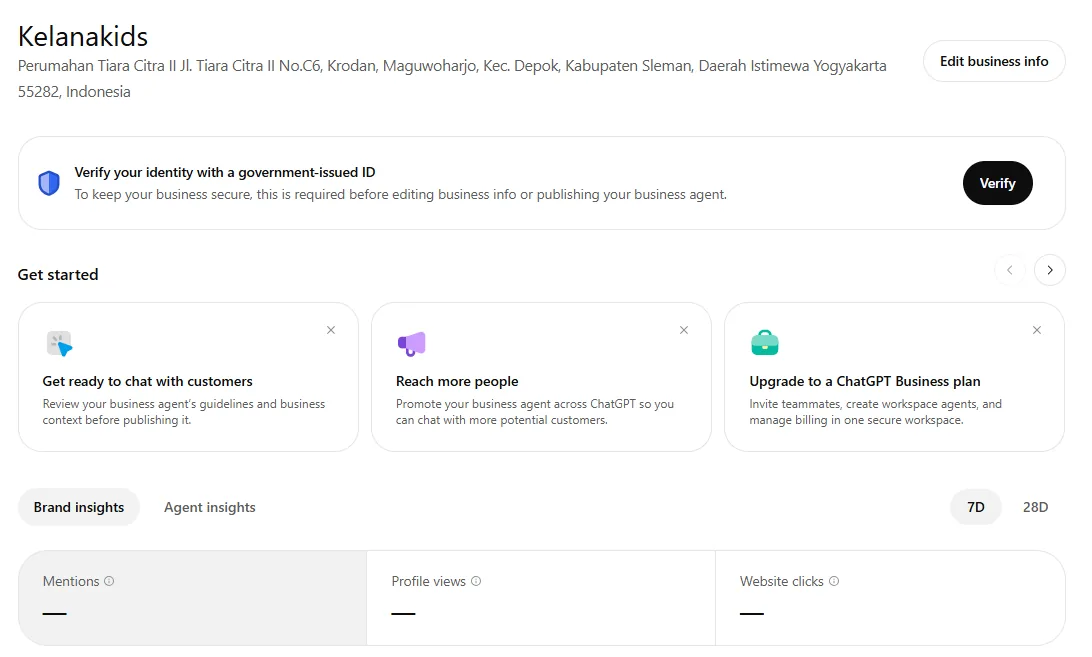
The third image shows the main business overview. The Kelanakids name and a business address in the Yogyakarta area appear at the top, along with an Edit business info button. Immediately below, an information banner says Verify your identity with a government-issued ID and explains that this step is necessary before changing business information or publishing a Business Agent.
The message is the most useful clue about the account’s current state. The earlier image confirms website access, but here the interface explicitly requests identity verification. These are separate processes. Clicking Edit business info does not mean the owner can necessarily publish changes without the additional approval. OpenAI’s Help Center states that Persona verification is necessary before publishing business-information changes, connecting product feeds, viewing available insights or creating an eligible agent.
Under Get started, three cards are visible: Get ready to chat with customers, Reach more people, and Upgrade to a ChatGPT Business plan. Their descriptions refer to preparing business-agent context, promoting the agent, and using a workplace subscription for team management and billing. The presence of a card is not proof that an agent is published, that advertising is active, or that a paid workspace subscription is required to claim the business.
The screenshot also repeats the Brand insights and Agent insights tabs, the 7D/28D control and blank metric cards. As a whole, it illustrates an early post-claim dashboard, not a mature analytics report. It would be inaccurate to invent any number of impressions, leads, sales or customers from these visuals.
Business Hub Features Explained
Business Profile Editing and Review
Once the claim and Persona verification are approved, eligible administrators can request updates to the website URL, business description, product or service category, logo, cover image, and, where relevant, delivery or return policies. OpenAI reviews submitted changes, so updates may take time to appear in a listing or in ChatGPT answers.
Keep the official name, service area, contact information and business links consistent with the website itself. A useful operational checklist includes ensuring that the landing page accurately represents the business, that branded assets are owned or licensed, and that policies do not omit relevant restrictions. These practices support user confidence and broader responsible AI adoption without assuming they are direct ranking factors.
Brand Insights and Discovery Topics
Brand Insights is designed to present aggregate information about business mentions and interaction. Discovery topics can add context by grouping common subject areas across answers in which the business was cited. OpenAI does not share the original conversations behind those aggregates, and report completeness depends on minimum activity thresholds. A topic share is a portion of reported discovery themes, not a representative market-share statistic.
For an agency, insights are best used as an ongoing observation layer. Keep a record of dates, reporting windows and changes to the website or product catalog; compare with site traffic and engagement; and avoid attributing a jump in mentions to one page or campaign without supporting evidence. This makes the dashboard more useful than a vanity-metric report.
Agent Insights and Business Agents
The Agent insights label is visible in the screenshots. However, none of the images demonstrates an active, published agent for Kelanakids. OpenAI’s Business Agent feature is a distinct experience that eligible businesses may create and test, using their own product details, guidelines and customer policies to answer questions in a business-representative conversation.
At launch, Business Agents were available to eligible U.S. ecommerce and online service businesses with websites, subject to industry requirements and Persona approval. They are not universally available in every country. Before publishing, an administrator should verify the agent’s answers to common customer questions, ensure material terms are visible, and avoid implying that the agent is an independent human advisor. See OpenAI’s Business Agents Policy for applicable restrictions.
Product Feeds and Shopify Integration
For businesses selling products, Business Hub can support a product feed that contains information such as prices and availability. OpenAI also describes integrations with Shopify and CSV feeds that follow the documented product-feed specification. A feed helps share current product information; connecting one does not guarantee that ChatGPT will recommend products, and it is separate from publishing a Business Agent.
Team Access and ChatGPT Business Plans
Administrators may be able to invite coworkers or grant agency access so authorized people use their own ChatGPT accounts. Good governance matters: assign responsibility for listing updates, permissions, verification documents and brand assets. The visible Upgrade to a ChatGPT Business plan card refers to a workspace subscription. OpenAI explicitly states that a ChatGPT Enterprise contract or advertising account is not required merely to claim an eligible business.
How to Complete Persona Identity Verification
- Open your claimed business profile in Business Hub.
- Locate the identity-verification banner shown in screenshot three, or the equivalent notice in your current interface.
- Select Verify and follow OpenAI’s official flow to Persona.
- Provide a government-issued ID, registration details or proof of authority only if the secure process requests them.
- Submit the requested information and monitor the decision or any request for further evidence.
- When approved, confirm which profile-management actions, insights and verified-badge indicators are enabled for your business.
Never send identity documents to an unverified email or a third-party website claiming to speed up the process. The OpenAI Help Center states that the blue verified badge is associated with approved Persona verification—not simply a successful DNS or website-access check. That is why the first and third Kelanakids screenshots can consistently show an approved website connection and an outstanding identity-verification request.
Why Is the Dashboard Empty Even After a Successful Claim?
Blank metrics can be expected during early reporting. Before concluding that the business has received no mentions, check whether identity verification is still pending, whether a seven- or 28-day window is selected, and whether reporting has had enough aggregate activity to satisfy privacy thresholds. OpenAI also says data may still be collecting or unavailable, and advises contacting Support if metrics remain persistently blank.
Do not conflate these measurements: an AI mention records a platform-specific appearance, a website click suggests that someone followed a link, and a lead or sale is a separate business outcome. Those three events are not interchangeable. Use a reliable measurement plan for on-site results and monitor organic traffic improvement, page quality and helpful editorial content alongside any new AI-discovery data.
Advantages, Limitations and Practical Recommendations
- Strength: a centralized location to manage authorized business information, confirm website access and, when available, inspect aggregate discovery data.
- Strength: a more direct way for businesses to provide current information, including product feeds for supported retailers.
- Limitation: regional and industry eligibility differs, and identity verification can remain outstanding after a domain claim.
- Limitation: insights may be blank until minimum activity thresholds are met; no individual chats or customer prompts are exposed.
- Limitation: an agent, profile badge and business subscription each have distinct requirements; none is a guarantee of recommendation rank.
For small businesses, the sensible priority is to claim the correct profile, finish the official identity check, maintain accurate information and verify any dashboard observations against website evidence. Consider improving website usability and clearly answering customer questions before attempting to infer an AI ranking strategy from an empty chart. For teams or agencies, maintain a simple audit log of changes and their dates.
Frequently Asked Questions About ChatGPT Business Hub
Can I use Business Hub immediately after claiming my listing?
An approved claim provides access to the business in Business Hub, but certain editing, product-feed, insights and agent capabilities require approved Persona verification and may have other eligibility rules.
Does Website access: Access confirmed mean the business is fully verified?
No. It demonstrates the website-access confirmation shown in the screenshot. The overview separately requests a government-issued ID, so the two milestones should not be conflated.
Why are Mentions and Website clicks displayed as dashes?
OpenAI explains that blank values may indicate insufficient aggregate activity, data collection in progress, or unavailable reporting. A dash does not necessarily mean zero activity.
What are the Top 5 discovery topics?
These are grouped themes from ChatGPT answers associated with the business. They are not complete search-query logs, customer chat transcripts or proof of purchase intent.
What is the difference between Brand insights and Agent insights?
Brand insights concern the business’s visibility and interaction, while Agent insights relate to agent activity if the product is available. A visible Agent insights tab does not establish that an agent has been published.
Can business owners read ChatGPT customer conversations?
No. OpenAI states that businesses receive aggregated insights, not individual prompts, consumer conversations or Business Agent chats.
Is ChatGPT Business or Enterprise required to claim?
No. An eligible business does not need an Enterprise agreement or an advertising account to claim its profile. Workspace subscriptions are a separate offering.
Does a claim improve rankings or guarantee recommendations?
No. OpenAI continues to compare and recommend businesses independently, and says that claiming does not guarantee higher placement or additional sales.
Is Business Agent available for businesses outside the US?
At the November 2026 launch, Business Agent eligibility was limited to qualifying ecommerce and online service businesses in the United States. Availability may expand, but should be checked rather than assumed.
What should I do if the dashboard never shows insights?
Verify the claim and Persona status, examine the available reporting window, allow for reporting thresholds, and contact OpenAI Support if values stay blank. Remove sensitive details from screenshots shared with support.
Conclusion: A Useful Management Hub, with Important Verification Limits
The Kelanakids screenshots show why Business Hub should be evaluated as a real operational product rather than a promise of instant AI visibility. Website access is confirmed, profile controls and insight areas are visible, yet activity metrics remain blank and the account still requests identity verification. An accurate review must preserve all of these facts, rather than illustrating imaginary performance or claiming that every feature is available in Indonesia.
For the beginning of the process, read our step-by-step business-claim guide. Once authorized, complete Persona verification, maintain accurate business details and monitor aggregated insights as they become available. These steps complement—not replace—your wider content, analytics and digital-marketing strategy.
Official Sources and Further Reading
- OpenAI — Introducing Businesses in ChatGPT (November 10, 2026)
- OpenAI Help Center — Setting up your business on ChatGPT
- OpenAI — Businesses in ChatGPT
- OpenAI — Businesses in ChatGPT Policy
- OpenAI — Business Agents Policy
