

What is ChatGPT Business Agent? It is a clearly labeled, business-representative conversation within ChatGPT. When a company appears in a relevant response, a customer may open its business profile and, if an agent is available, choose to start a separate conversation. The agent can explain the company’s products, services, policies and options using information provided by that business. It does not replace ChatGPT’s independent recommendations or turn every interaction into an advertisement.
For owners asking how to create one, the basic sequence is to claim the business, obtain approval for Persona identity verification, confirm that the company meets the agent’s location and industry requirements, prepare information and answering guidelines, test the draft with customer questions, and publish the agent once it is ready. The word eligible matters: at the November 10, 2026 launch, Business Agents were available to qualifying ecommerce and online service businesses in the United States, rather than every claimed company worldwide.
This article explores how the product works, what it can and cannot do, and how marketing and ecommerce teams should plan a responsible launch. Our discussion is based on OpenAI’s official materials reviewed on November 16, 2026, while Businesses in ChatGPT is still in beta. Feature names, onboarding steps and supported industries may evolve.
How a Business Agent Appears to Customers
Customers generally begin with an ordinary question in ChatGPT. The assistant may present a relevant business and a link to its profile, regardless of whether that organization has an agent. If a published agent is available, the person can choose to enter a separate chat with that business. The conversation is identified as representing the company, and it can use the approved product details and policies the business has prepared.
For example, imagine a shopper comparing several versions of a pair of shoes. After opening a brand’s agent, the person asks whether a particular size is in stock or how returns work for discounted items. The agent can provide information based on the brand’s current catalog and terms, then direct the shopper to a website page if a transaction or another action is needed. The customer remains in control of whether to follow that link.
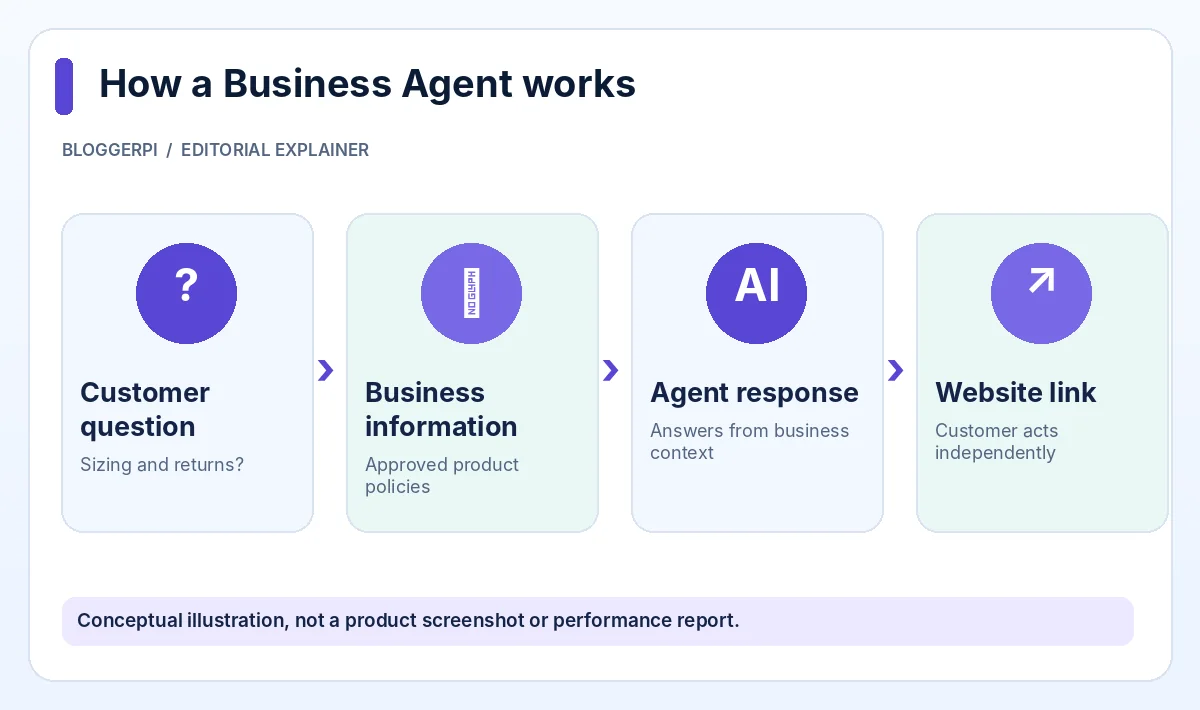
This experience should not be confused with the independent answer that originally displayed the business. OpenAI explicitly separates the agent conversation from the user’s ordinary ChatGPT chat and states that claiming a business does not grant control of independent comparisons. For a more detailed discussion, read whether claiming a business changes ChatGPT recommendations.
Business Agent Versus ChatGPT Business, Custom GPTs and Advertising
A separate business conversation, not the regular assistant
In a normal ChatGPT exchange, the assistant helps the user with a question without taking the position of one specific company. Inside a Business Agent conversation, the customer knows that an AI is representing the business whose profile they opened. The Business Agents Policy requires that distinction to remain clear. It prohibits pretending to be a human, an independent adviser or a company officially endorsed by OpenAI.
Not the same as a ChatGPT Business workspace
ChatGPT Business is a workspace subscription for teams that want to use ChatGPT in their internal operations. A Business Agent is a consumer-facing experience attached to an eligible business profile. A workspace subscription is not automatic permission to publish an agent, and businesses do not need a ChatGPT Enterprise agreement merely to submit an eligible listing claim. These products have different access and governance models.
Not simply a custom GPT or website chatbot
A company might already operate a custom GPT, a live-chat widget on its website, or a customer support system. Those tools can be useful, but they do not become the Business Agent associated with its public ChatGPT business profile. Capabilities, distribution and data connections can differ. OpenAI also states that a Business Agent’s separate conversation does not automatically use the capabilities of a ChatGPT plugin operated by the same business.
Sponsored experiences are a different channel
OpenAI has described sponsored Business Agents and agent experiences linked to advertising, with clear labeling for paid placements. Ads do not influence ChatGPT’s independent answers. There is also a practical configuration distinction: OpenAI’s support materials note that Business Hub agent settings and Ads Manager agent settings do not currently synchronize automatically. Teams using both need to understand which product they are editing.
Features That Can Be Useful to Customers and Owners
- Product and service questions: customers can ask follow-up questions in a conversational format rather than searching through multiple pages.
- Business-managed context: owners can provide current product details, return policies and answering guidelines for the agent.
- Preview before launch: the administrator can test common questions, correct mistakes and repeat the test.
- Relevant website links: the experience can help a customer take the next step at the official business website.
- Clear identification: the interface makes it apparent that the conversation represents a particular business, not an independent neutral comparison.
These benefits depend on the quality and timeliness of the source material. A poorly prepared agent can still give confusing or outdated answers. Businesses should regard agent creation as ongoing information management, not simply the installation of a marketing plugin. Our guide to business profile accuracy covers related preparation work.
Who Can Create a Business Agent?
The current eligibility rule is narrower than the rule for claiming a listing. OpenAI’s Help Center says agents are available to eligible ecommerce and online service businesses in the United States that have a website and meet the industry requirements described in the Business Agents Policy. Ownership or authorized representation is mandatory. The company must also have its listing claim and Persona identity verification approved.
The initial claim may have used business phone, business email, domain DNS or Shopify, depending on the options offered. Persona is different: it establishes the person’s identity and authority to act on behalf of the organization. OpenAI may request a government-issued ID, business registration details and supporting evidence. Submitting those documents is not the same as having verification approved.
A business in Indonesia may be able to claim an eligible profile without qualifying for a Business Agent. Do not assume that the presence of a promotional agent card in Business Hub overrides eligibility limits. For details on who can claim, see the Indonesian business eligibility guide, and for the identity steps, see email, DNS and Persona verification.
How to Create a ChatGPT Business Agent: Step by Step
Step 1: Claim the correct business
Sign in to ChatGPT on the web, open Business Hub and locate the organization. Check the website and name to ensure the listing belongs to the company. Choose a supported verification method and provide evidence through the official process. OpenAI reviews the claim and sends its decision by email. If the request is still pending, wait rather than trying to open the agent builder through another account.
Our step-by-step ChatGPT business claim tutorial provides a visual record of the initial process, including a real DNS TXT verification example. The record in that example is specific to the original claimant and must not be reused for another business.
Step 2: Obtain Persona approval and check eligibility
Once the initial claim is approved, open the claimed business and complete the identity-verification prompt through Persona. Wait for the explicit approval decision. Then confirm that the company meets the region, category and website requirements for creating an agent. A missing builder option may reflect eligibility rather than a technical malfunction.
Step 3: Create or open an existing draft agent
In the Business tab, select the relevant profile. If Shopify setup has already created a draft agent, review that draft. Otherwise, choose the option to create an agent if the interface offers it. Shopify is not universally required to create a Business Agent; qualifying businesses can configure the experience without a Shopify store.
Step 4: Prepare product and policy information
Collect accurate information about the products or services, prices where appropriate, availability, delivery terms, returns, and any material conditions. Add guidelines on how the agent should respond. The Business Agents Policy prohibits inventing claims, qualifications, reviews, guarantees or offers. It also prohibits hiding fees or limitations when they matter to the customer’s question.
A practical instruction might tell the agent to explain differences between two product options using the current catalog, acknowledge when stock information is unavailable, and provide an official link for checkout. It should not invent a promotion, overstate the effectiveness of a product, or pressure someone into a purchase. The clearer the sources, the easier the agent is to review.
Step 5: Preview with realistic questions
Use the Preview capability to ask questions a new customer would actually ask. OpenAI suggests scenarios involving return policies, including discounted items. Test both simple and difficult cases: an out-of-stock variation, a delivery exception, a warranty limitation, or a question the business cannot answer from its current documents. When the answer is wrong, update the information or instructions and test again.
Testing should include situations in which the agent needs to decline an inappropriate request. It must not disclose another customer’s information or ask for government IDs, banking credentials or authentication codes for a routine sales pitch. If a question requires a human decision or licensed professional advice, the agent should not pretend it can provide that authority.
Step 6: Publish and maintain the agent
When the information is accurate and the organization is eligible, select Publish. Customers can only initiate conversations with a published agent. After launch, keep the content updated as stock, pricing, delivery conditions and policies change. OpenAI can review agent behavior and restrict agents that breach policy, so ongoing quality assurance matters as much as the initial setup.
Infographic: Six Steps from Claim to Publication
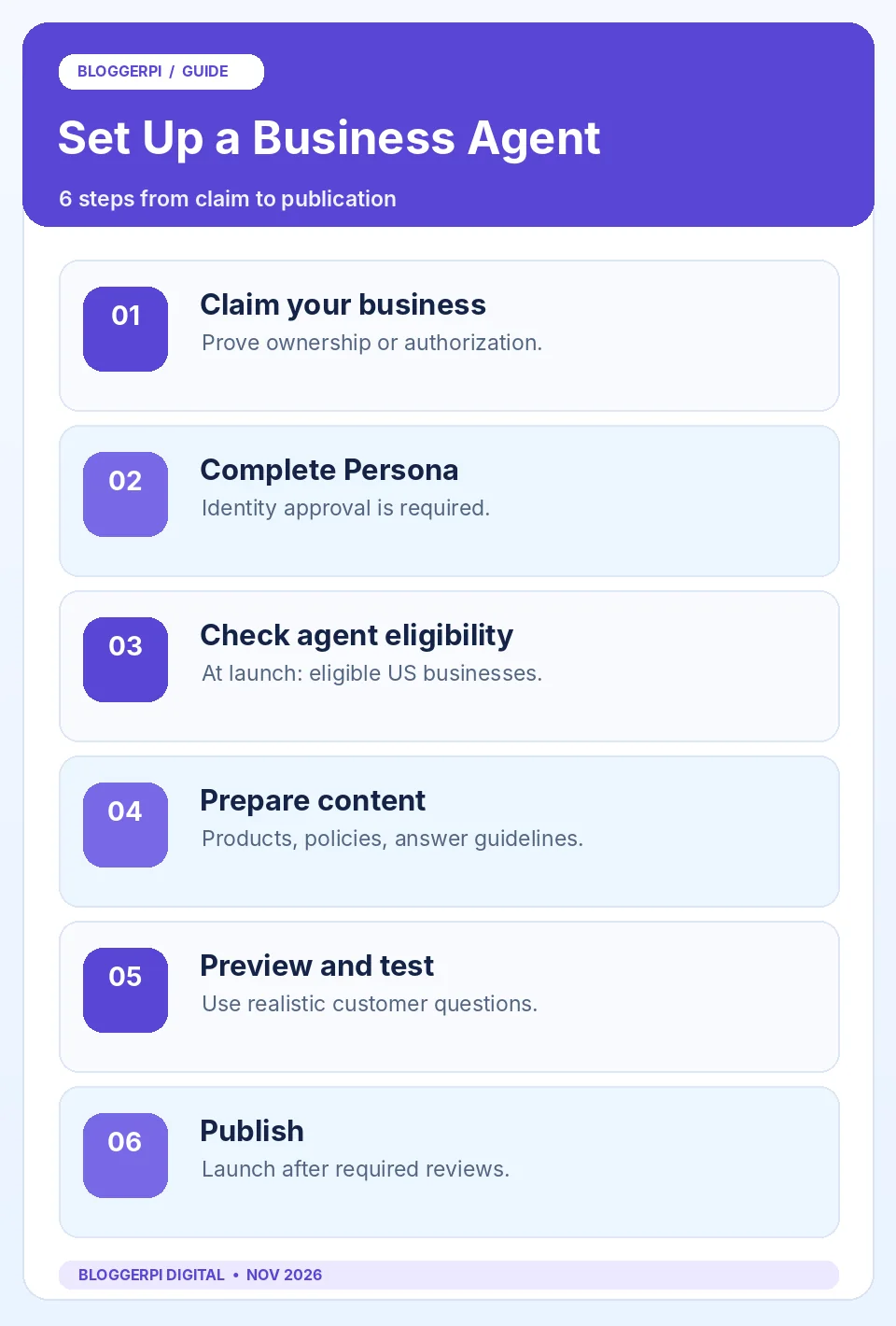
This is an editorial checklist, not a guarantee of access or a substitute for the instructions shown to your business. In particular, no sequence can bypass the agent’s geographic and industry requirements. A company can have a properly verified profile while remaining ineligible to create an agent.
Important Limits: Orders, Bookings and Data Access
As currently documented, a Business Agent can explain a company’s offerings and link people to its website, but it cannot complete purchases, make bookings or look up an individual customer’s order within the agent conversation. Those actions must be completed through appropriate business channels. Avoid claiming the product has checkout or customer account access unless a future official capability supports it.
Similarly, having a plugin in ChatGPT does not mean the agent automatically uses that plugin’s tools. The experience is separate. Business owners should plan how a person will transition from an informational conversation to a secure authenticated website or support process where personal information and transactions can be handled appropriately.
Safety, Privacy and Editorial Responsibilities
The Business Agents Policy requires honest representation and prohibits manipulative selling, deceptive urgency, unnecessary requests for sensitive personal information, impersonation and unsupported professional claims. Agents should not keep pushing follow-up contact after someone declines. They also must not submit forms or send user information to the business without explicit authorization through an approved feature.
Another important boundary concerns customer conversations. OpenAI says businesses receive aggregate insights subject to privacy thresholds, not the individual prompts or conversations customers have, including chats with Business Agents. Owners should not plan a reporting system that assumes they can read every message. See our guide to ChatGPT Business Insights for the difference between platform metrics and website analytics.
A Practical Launch Checklist for Marketing Teams
- Confirm that the actual business name, official website and registered representative match the claimed profile.
- Obtain explicit Persona approval and check the agent’s country and industry eligibility.
- Review product information, return policies, delivery limitations and current links before entering them.
- Test routine customer questions, edge cases, inaccurate assumptions and requests for restricted information.
- Make sure the agent does not promise checkout, order lookup or a service it cannot perform.
- Define an owner for content updates, approval of policy changes and periodic testing after launch.
The checklist should be considered part of a wider customer experience strategy. Businesses still need useful website pages, credible claims and clear navigation because the agent is not the final destination for every action. The same foundations support trustworthy content practices and responsible ChatGPT Search optimization, without suggesting either is a secret agent-ranking signal.
Frequently Asked Questions
Is a Business Agent the same as ordinary ChatGPT?
No. A Business Agent is a separate, labeled experience representing one business. Ordinary ChatGPT answers remain independent.
Can businesses outside the US create one?
At the November 2026 launch, eligibility is limited to qualifying ecommerce and online service businesses in the US.
Is Shopify mandatory?
No. Eligible businesses can create an agent without Shopify. A Shopify integration can provide catalog information.
Do I have to pass Persona verification?
Yes. An approved claim and Persona identity verification are prerequisites for the eligible agent workflow.
Does connecting Shopify publish the agent automatically?
No. A draft agent must still be reviewed, tested and deliberately published.
Can an agent take payments or make bookings?
Not in the current experience. It can provide information and link customers to the business website.
Can I read individual agent conversations?
No. Business Hub provides aggregated insight rather than individual customer prompts or chats.
Will an agent guarantee higher recommendations?
No. The agent is separate from ChatGPT’s independent recommendations and does not guarantee placement or sales.
What if the agent gives a wrong answer?
Correct the business information or answering guidelines, retest with Preview and follow the supported update workflow.
Conclusion
Business Agents make it possible for eligible organizations to offer a clearly identified conversational experience inside ChatGPT. They are most useful when they help people understand real products and policies and choose an appropriate next step. They are not a universal chatbot deployment channel, an independent recommendation shortcut or an automated purchasing system.
Begin with the Businesses in ChatGPT overview and the post-claim dashboard review, then confirm the requirements before investing in agent setup. Good product information and a reliable website remain valuable regardless of whether your business currently qualifies for agent publishing.
Official References
- OpenAI Help Center — Setting up your business on ChatGPT
- OpenAI — Introducing Businesses in ChatGPT, November 10, 2026
- OpenAI — Business Agents Policy
- OpenAI — Businesses in ChatGPT
