

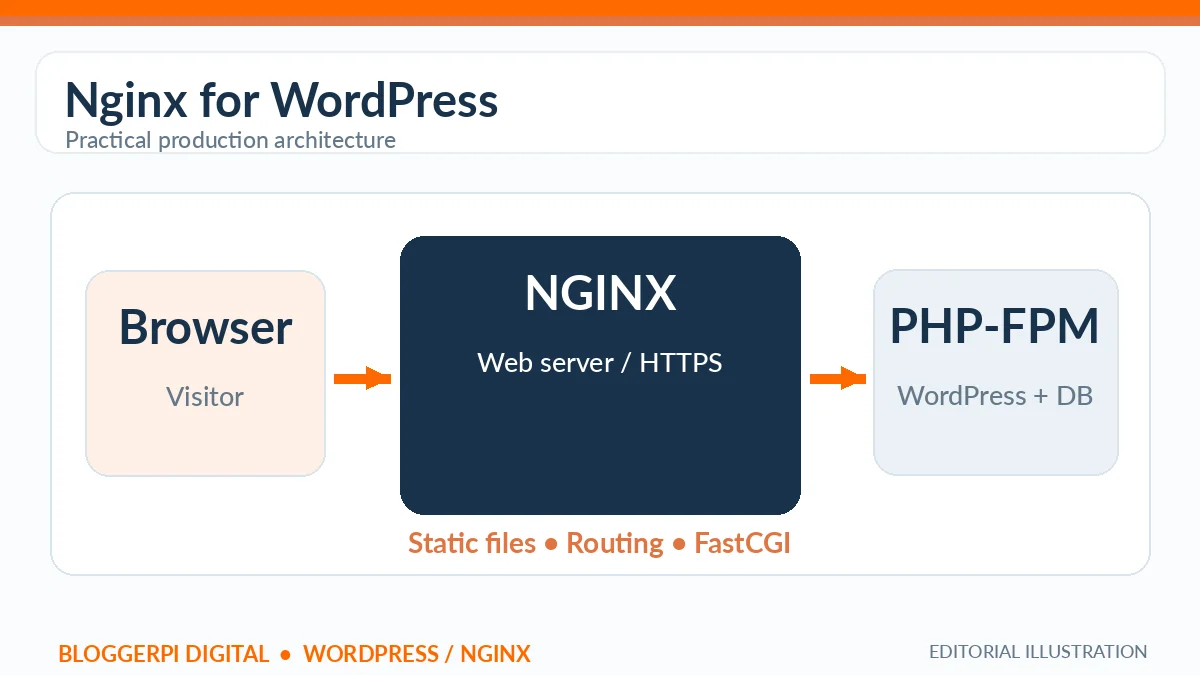
Configuring Nginx for WordPress requires more than copying a server block from a tutorial. Your operating system, PHP-FPM pool, document root, TLS termination, reverse proxy, and existing caching layers determine whether an example is appropriate. A configuration copied without modification can break pretty permalinks, expose sensitive resources, serve cached customer data to other visitors, or prevent administrators from signing in. This guide provides an educational Nginx/PHP-FPM template and a structured method for understanding, validating, securing, and troubleshooting a WordPress deployment. It is not a production-ready replacement for your hosting provider’s configuration.
How Nginx fits into the WordPress request path
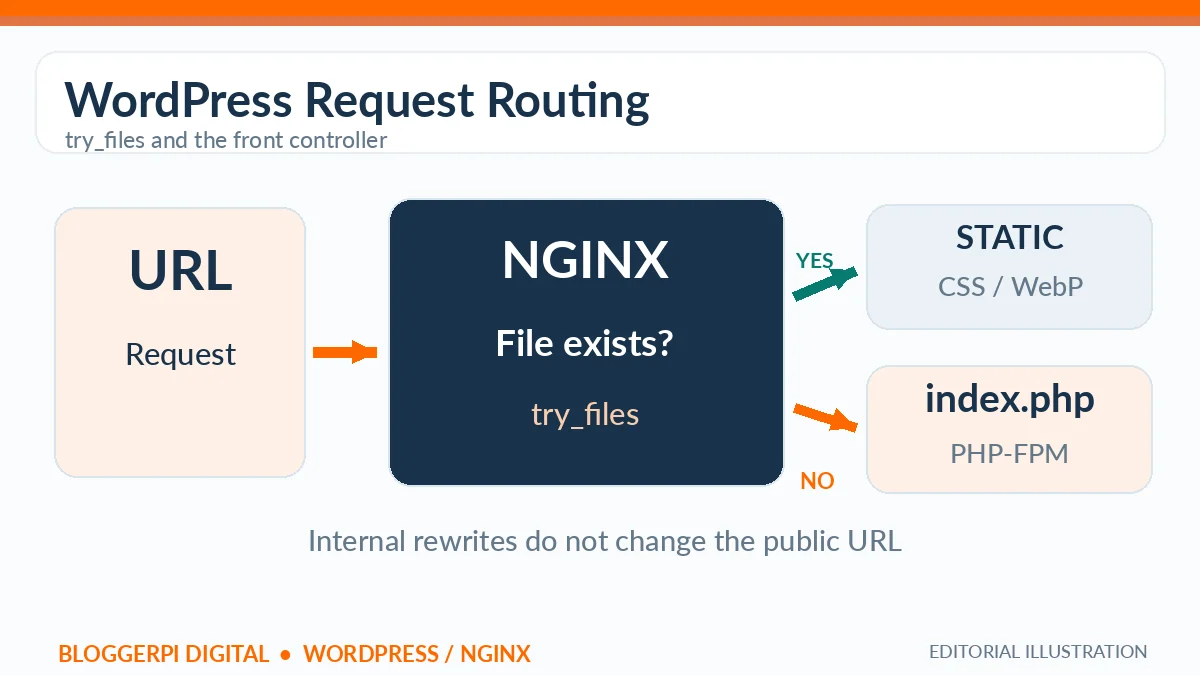
Nginx accepts incoming HTTP(S) requests and can serve static resources such as images, CSS, and JavaScript directly. It sends PHP requests through the FastCGI protocol to PHP-FPM, while WordPress uses PHP and a database to generate pages. When a visitor requests a pretty permalink that is not a physical file, Nginx generally passes the request internally to WordPress’s front controller, index.php. This internal route is not the same as a public 301 redirect.
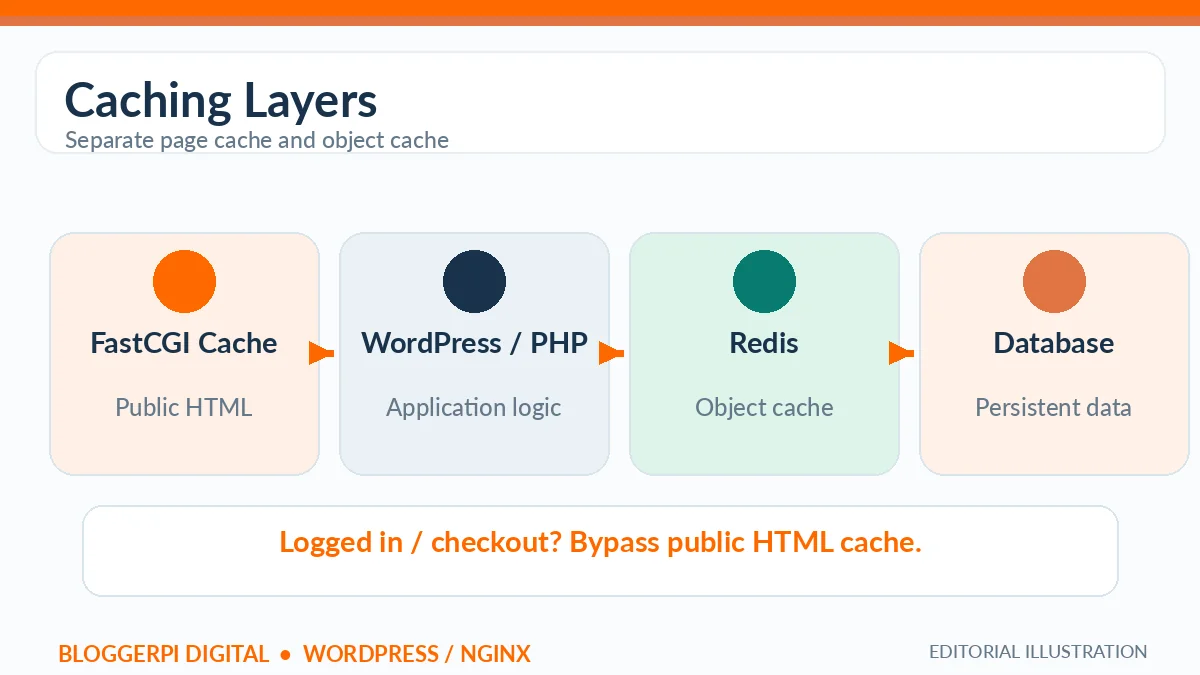
Caching components have different responsibilities. Nginx FastCGI Cache may store generated HTML pages, while Redis object caching can hold repeatable application data and avoid some database operations. A CDN adds yet another layer. These technologies are complementary but not interchangeable. Review our WordPress Redis object-cache guide and comparison of WordPress caching plugins before adding tools that may duplicate existing behavior.
Inventory the server before touching a configuration file
Determine the Linux distribution, installed Nginx version, PHP-FPM listener, document root, active virtual host, TLS certificates, and whether a panel or CDN controls part of the configuration. Managed hosting platforms often regenerate virtual-host files, and manual edits can disappear on the next deployment. If a hosting provider manages Nginx for you, ask for its supported customization mechanism instead of editing system files you do not own.
Keep a backup of the active configuration and a way to recover access if reload fails. A staging website is the safest place to test. Check the WordPress Address and Site Address settings using our guide to WordPress settings. When WordPress is installed under a subdirectory or behind a reverse proxy, the URL and filesystem relationships can be more complex than the root-domain example shown below.
Understanding listen, server_name, root, and index
An Nginx server { ... } block describes how requests for particular hostnames are handled. listen selects a port and protocol, server_name identifies the expected host, root points to the real WordPress directory, and index selects an index file when a request targets a directory. The HTTP-only example is intentionally limited to explaining the request path. A public deployment must incorporate appropriate HTTPS configuration.
Cloudflare or another proxy may terminate browser TLS and make a new encrypted connection to your origin. Confirm that the origin certificate, forwarding headers, and redirect policies agree. Our WordPress HTTPS setup guide covers that process. A mismatch between the proxy’s scheme and the origin’s redirect behavior can create loops that the Nginx snippet alone cannot resolve.
A basic Nginx server block for WordPress and PHP-FPM
The template below uses an example domain, document root, and PHP-FPM socket. Replace these values based on the local server, not guesses from a blog. It explicitly sets SCRIPT_FILENAME when using fastcgi_params; some packaged setups use fastcgi.conf instead and may already define the parameter. Do not accidentally configure it twice or expose a FastCGI listener to the public internet. Always run nginx -t and check the result before making a controlled reload.
# EDUCATIONAL TEMPLATE: replace hostname, root and PHP-FPM socket
server {
    listen 80;
    server_name example.com;
    root /var/www/example.com/public;
    index index.php index.html;

    location / {
        try_files $uri $uri/ /index.php?$args;
    }

    location ~ \.php$ {
        try_files $uri =404;
        include fastcgi_params;
        fastcgi_param SCRIPT_FILENAME $document_root$fastcgi_script_name;
        fastcgi_pass unix:/run/php/php-fpm.sock; # REPLACE on your server
    }

    location ~ /\.(?!well-known).* { deny all; }
}
The example serves HTTP only and therefore needs a proper TLS-enabled arrangement before public deployment. Virtual hosts generated by a hosting panel should be modified only through the supported configuration extension. If you are still deciding whether to operate your own server, compare the maintenance obligations in our VPS and web-server overview rather than assuming a self-managed setup is always cheaper.
Why try_files matters for WordPress permalinks
The typical expression try_files $uri $uri/ /index.php?$args; first checks whether a request maps to an existing file or directory. If it does not, Nginx internally forwards it to WordPress’s front controller. Without the correct routing, your homepage may work while individual articles return 404 errors. The best location block depends on the actual WordPress root and any additional applications sharing the hostname.
WordPress installed in its own directory, WordPress multisite, and reverse-proxy deployments can require different rules. Test a post, category archive, paginated archive, REST endpoint, XML sitemap, and a genuine nonexistent URL after changing the server block. Read our safe WordPress permalink migration guide to distinguish internal rewriting from external permanent redirects. Both matter, but they solve different problems.
Connecting to PHP-FPM safely with fastcgi_pass
fastcgi_pass specifies the PHP-FPM listener: often a Unix socket or an internal TCP address. The path in a generic example may be wrong on your distribution or PHP version. Inspect the active PHP-FPM pool to find its actual listen value and file permissions. An absent socket, stopped PHP-FPM service, or incorrect permissions can produce a 502 Bad Gateway response. Use our 502 Bad Gateway troubleshooting guide to separate web-server and application causes.
The PHP location also includes try_files $uri =404; so nonexistent PHP filenames are not blindly handed to FastCGI. Ensure that SCRIPT_FILENAME points to the intended script. Deployments using symlinked release directories may use $realpath_root instead of $document_root. PHP-FPM should not be reachable from untrusted networks; use a private socket or otherwise restrict access to authorized components.
Hardening Nginx: sensitive files, uploads, and TLS
Unlike Apache, Nginx does not interpret WordPress .htaccess rules. Your configuration must protect files such as wp-config.php, private backups, debug logs, and other resources that should never be downloaded. Dotfile protection requires a deliberate exception where validation endpoints such as .well-known must remain reachable. Regular-expression location precedence deserves attention because a broad pattern can override a more specific intended route.
Uploaded media should be served as content, not turned into executable PHP merely because a file carries a script-like extension. Apply least-privilege filesystem permissions and keep access credentials separate from public files. Maintain backups and verify that restoration works; the process in our automated MySQL backup guide covers one related operational concern. A security plugin cannot correct an exposed server configuration by itself.
FastCGI Cache: where it helps and where bypass is essential
FastCGI Cache can avoid repeated PHP processing for anonymous public pages when multiple visitors request equivalent content. It can also be dangerous when personal data or transactional HTML is cached for the next visitor. Do not cache WordPress admin pages, customer accounts, checkout, carts, or other personalized responses as general public HTML. Cookies, request methods, query parameters, and endpoint behavior all affect the caching policy.
Use both fastcgi_cache_bypass and fastcgi_no_cache appropriately to prevent serving and storing responses that must remain private. Start with anonymous GET and HEAD traffic and design explicit exclusions for logged-in cookies, WooCommerce session data, dynamic pages, and plugin-specific endpoints. A copied cookie regex is never a comprehensive guarantee: site extensions can add new stateful URLs and cookies. Compare server caching with the responsibilities of a WordPress caching plugin to avoid unmanaged double page caching.
Inspect cache status without exposing a user session
On a test environment, a temporary response header such as X-Cache-Status: $upstream_cache_status can help interpret MISS, HIT, BYPASS, and EXPIRED states. That header alone does not prove the cached HTML is safe. Test repeated anonymous visits, then repeat the same routes with authenticated and transactional sessions. A personalized page must never be served from an unsegmented public page cache.
Use repeatable tests, log samples, and consistent network conditions when comparing before and after. Watch origin response time, errors, and browser performance. The recommendations in our WordPress PageSpeed Insights guide and native lazy loading versus plugins explain why page-cache HIT rates do not tell the whole user-experience story.
Safe deployment: backup, syntax test, reload, and rollback
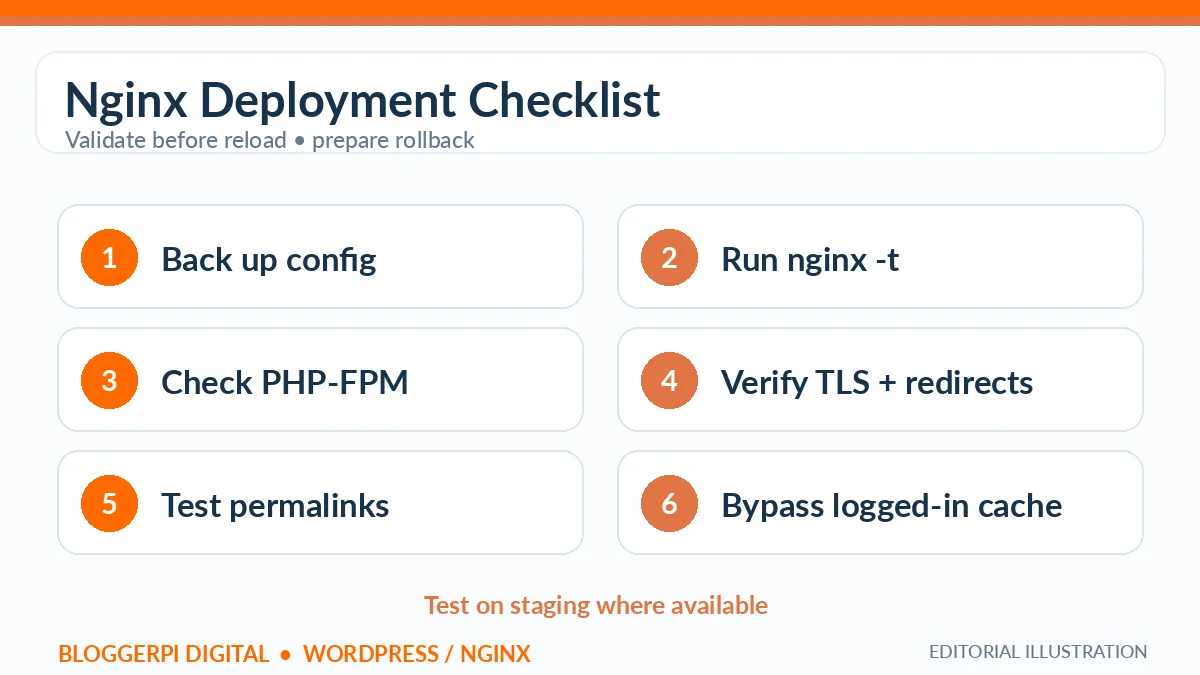
Before editing, save the current virtual-host configuration and confirm how you will revert it. If a control panel manages these files, apply changes using its supported extension points. Run nginx -t to validate syntax and referenced files. Only after a successful test should you reload, for example using systemctl reload nginx on a systemd-based Linux host with that service name. Other distributions, init systems, and container setups use different commands.
After reload, inspect the homepage, individual articles, categories, login/logout, wp-admin, REST API, sitemap, and forms. Verify HTTPS redirects, response codes, and personalized cache bypass. Monitor error logs and metrics. If behavior regresses, restore the known-good configuration, run a syntax check again, and reload safely. Managed WordPress hosting options may offer a supported path for these changes without taking full responsibility for server administration.
Troubleshooting Nginx problems on WordPress
404 on posts: confirm document root, try_files, and permalink routing. 502 Bad Gateway: check that PHP-FPM is running and the listener, permissions, worker limits, and timeouts match the Nginx configuration. 403 Forbidden: inspect directory permission and index selection rather than granting world-writable permissions. Redirect loop: trace HTTPS rules at the proxy, origin, and application layers.
Someone else’s account content appears: stop public page caching and correct the bypass policy. Missing styles or images: check static resource paths, permissions, MIME types, and CDN behavior. REST API failure: inspect overlapping location rules and authorization. With multiple backends, our load-balancing methods overview can help explain why user state needs deliberate handling. Diagnose each symptom from evidence rather than changing unrelated settings at once.
Does Nginx configuration improve SEO?
A well-configured Nginx origin can make pages reliably accessible and reduce unnecessary processing. That is useful for visitors, but changing a web server is not an automatic ranking upgrade. Search engines still need crawlable URLs, sensible status codes, canonical destinations, and helpful content. Verify sitemap access and redirect consistency, then monitor real indexing through Google Search Console and GA4 via Site Kit instead of claiming success based solely on a faster server benchmark.
Images, fonts, JavaScript, CDN configuration, and the underlying hosting also influence experience. A complicated configuration can introduce more downtime than it saves. Make one change at a time, record the baseline, test representative user journeys, and keep changes only when they provide observable benefits.
Special considerations for hosting control panels
Control panels such as CWP, Plesk, and managed hosting dashboards may generate Nginx configuration files from their own templates. Before editing, determine whether Nginx communicates directly with PHP-FPM, forwards traffic to an Apache backend, or acts only as a reverse proxy to another application server. The direct fastcgi_pass example in this guide is not suitable for every reverse-proxy arrangement, because another layer may actually execute PHP. Do not mix distinct architectures without tracing how a request reaches WordPress. For multi-domain servers, document which component owns each virtual host, TLS certificate, cache policy, and client-IP forwarding rule.
If a panel manages the site, prefer documented custom include files or its supported configuration controls. Verify whether the change survives regeneration after a panel update. Disabling Apache or replacing a complete virtual host to imitate an “Nginx-only” tutorial may break other applications on the same server. For a technical support request, collect a sanitized view of the effective configuration, the PHP-FPM service status, and relevant error logs rather than publishing passwords, cookies, or customer data. Keep a change log and rollback instructions so colleagues know which settings are intentional and which earlier experiments caused problems.
Frequently asked questions about Nginx and WordPress
Can I paste the sample directly into production?
No. Replace host, root, PHP-FPM listener, TLS settings, and panel-specific arrangements. Test on staging and run nginx -t before reloading.
Does Nginx read .htaccess files?
No. WordPress permalink and access rules must be expressed in the appropriate Nginx configuration or another routing layer.
Does Redis replace FastCGI Cache?
No. Redis object caching and Nginx page caching operate at different stages and have different security requirements.
Is FastCGI Cache safe for WooCommerce?
Only after deliberately excluding personalized carts, checkout, account pages, session cookies and other dynamic requests, then verifying behavior.
How do I check a proposed Nginx config?
Typically with nginx -t, followed by a controlled reload if validation succeeds. Service names and init mechanisms differ.
Do I need a WordPress caching plugin as well?
Not necessarily. Choose a clearly owned page-cache strategy, and add separate object caching only when your application and hosting support it.
Official references
- WordPress developer handbook: Nginx
- Nginx: ngx_http_core_module / try_files
- Nginx: ngx_http_fastcgi_module
- Nginx: How Nginx processes a request
- Nginx: ngx_http_limit_req_module
- WordPress: WordPress in its own directory
Bottom line: a reliable WordPress Nginx setup depends on correct document roots, PHP-FPM routing, permalink handling, HTTPS, file protection, and realistic tests for both anonymous and authenticated users. Treat the sample as a teaching reference that must be adapted to the actual server. For business-critical websites, preserve a rollback plan and document every deployment verification.
